How a markdown-backed kanban board fills the awkward gap between agent orchestrators and the humans who still have to approve, review, and decide.
This is Part 1 of a 3-part series on building the human layer in AI agent systems. Part 2: How to Wire It → · Part 3: Real Workflows →
TL;DR
- Agent orchestrators handle machine state well but leave human participants without a shared, durable workspace.
- kanban-lite gives both humans and agents a single board they can read, write, comment on, and act through — stored as plain markdown, accessible via Web UI, VS Code, CLI, REST API, SDK, MCP, or n8n.
- It is MIT-licensed, open-source, and plugs into your existing stack instead of replacing it.
AI workflow tools are getting very good at machine-to-machine orchestration.
Planner agent kicks off research. Research hands off to a writer. Writer hands off to an evaluator. Evaluator decides whether to retry, escalate, or finish. On paper, it looks beautiful.
Then the workflow hits the part that most teams still haven't solved cleanly:
A human needs to step in.
Not a developer staring at traces. An editor. A PM. A support lead. A compliance reviewer. Someone who wants to answer a simple question:
What is waiting on me, what happened already, and what should happen next?
That's where most agent pipelines get awkward.
- The state is visible only inside an orchestration UI.
- Approval arrives as a Slack message with no durable context.
- Comments live in email, not next to the work.
- If the service restarts, the "conversation" around the task is scattered across three tools and two half-remembered tabs.
Graph-based orchestration is excellent for machine state. It is usually much weaker at shared human state.
The Idea: Put Workflow State Somewhere Humans Can Actually Work With It
kanban-lite is not an agent framework. It does not replace LangGraph, CrewAI, n8n, Temporal, or your orchestrator.
What it gives you is a human-readable, machine-actionable control surface for the parts of the workflow that humans actually have to touch.
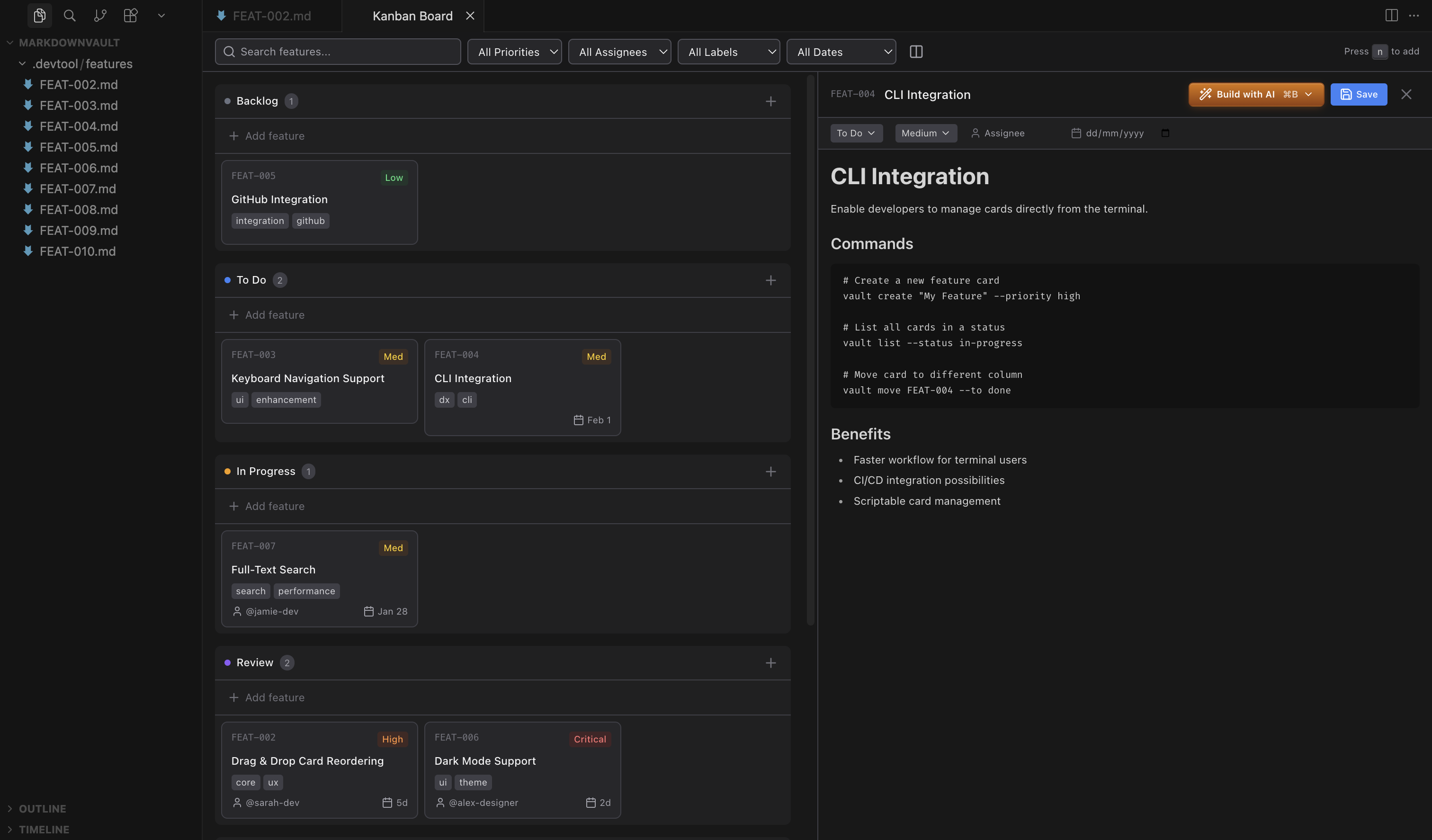
Cards are markdown with YAML frontmatter. By default, they live in your repo under .kanban/boards/<boardId>/<status>/. So instead of a workflow instance being "some object in a hidden backend," it looks like this:
---
id: blog-post-q3-launch-2026-03-19
status: review
priority: high
assignee: maya
dueDate: 2026-03-25
labels: ["marketing", "agent-generated"]
actions:
  retry-draft: "Retry with softer tone"
  approve-publish: "Approve & Publish"
---

# Q3 launch blog post

Initial draft attached. Needs human tone review before publishing.
That card is:
- Visible without opening a proprietary dashboard.
- Version-controllable alongside your project.
- Rich — it can carry comments, attachments, logs, assignees, labels, due dates, named actions, and structured forms.
- Accessible from the web UI, a VS Code extension, the CLI, REST API, TypeScript SDK, MCP tools, or an n8n node.
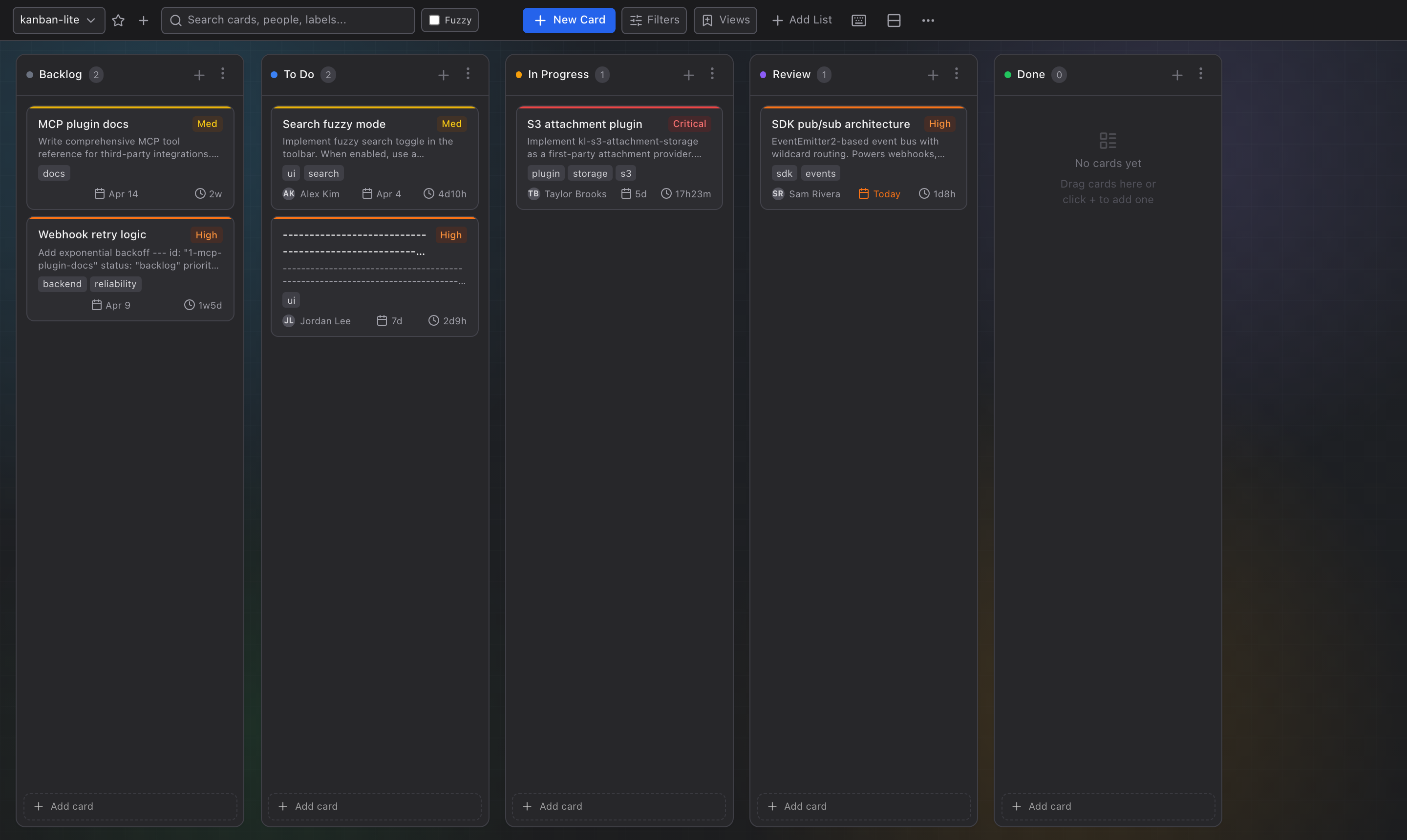
The board structure isn't locked to one workflow either. Teams can create columns, move work between them, minimize inactive columns, and shape a board that fits a real process instead of a demo process.
Two Integration Signals, Not One
Most articles about human-in-the-loop treat "the human did something" as a single event. kanban-lite separates it into two distinct signal types, and the difference matters.
1. Mutation webhooks — something changed
When state changes on the board, kanban-lite emits events like task.created, task.moved, comment.created, attachment.added, form.submit.
If a reviewer drags a card from in-progress to review:
{
  "event": "task.moved",
  "timestamp": "2026-03-19T14:32:00.000Z",
  "data": {
    "id": "blog-post-q3-launch-2026-03-19",
    "status": "review",
    "previousStatus": "in-progress"
  }
}
That event can resume your orchestrator, notify downstream, or kick off validation.
2. Action webhooks — explicit human intent
Card actions are different. If you define actions like retry-draft or approve-publish, kanban-lite sends a POST to the configured actionWebhookUrl with the action name and full card context.
- Mutation webhook: "This card moved to review."
- Action webhook: "A human explicitly clicked
approve-publishon this exact card."
Those are not the same signal. Separating them makes real workflows much cleaner. Your orchestrator can react to ambient state changes and respond to deliberate human commands through the same board surface.
Forms: When "Leave a Comment" Isn't Enough
Many HITL moments need more structure than a text note and a button.
Legal approvals. Release sign-offs. QA checklists. Incident intake. These require required fields, enumerated outcomes, and typed values.
kanban-lite supports schema-driven form tabs backed by JSON Schema. A card can carry one or multiple forms, each rendered as its own tab alongside markdown, comments, and logs. Submitted values are stored under formData[formId], validated before save, and emitted as a form.submit webhook event.
That means the human control surface is not just readable — it's validatable. And it works through every interface: web app, CLI, REST API, SDK, MCP, and n8n.
Not Just a Board — An Ecosystem
What makes kanban-lite more than a clever markdown trick is the ecosystem around it:
- Plugin architecture with capability namespaces:
card.storage,attachment.storage,webhook.delivery,auth.identity,auth.policy,card.state - Storage providers: Start with markdown files, migrate to SQLite or MySQL when you need scale. S3 for attachments.
- Auth & RBAC: Optional
kl-auth-pluginwith identity resolution and role-based policies (user / manager / admin). - n8n integration: A dedicated node package (
n8n-nodes-kanban-lite) covering boards, cards, columns, comments, attachments, forms, webhooks, storage, and auth — with both remote API and local SDK transport modes. - AI agent skill:
npx skills add https://github.com/borgius/kanban-litegives Claude Code, Codex, or any skills.sh-compatible agent full board access in one command. - Real-time sync: WebSocket-powered live updates across all connected clients.
The Honest Caveats
- It is not a workflow engine. You still need your orchestrator.
- Webhook delivery is fire-and-forget with HMAC-SHA256 signing. For retries and persistent queues, use n8n, Make, or Zapier as the receiving end.
- The plugin ecosystem is young. SQLite, MySQL, S3, auth, and webhooks are first-party, but the third-party community is just starting.
- If you need enterprise audit logs or SOC 2 compliance out of the box, you'll need to build that layer.
Calling these out makes the tool more credible, not less.
The Bigger Point
Most AI workflow discussions obsess over planners, evaluators, routing logic, and model selection. All of that matters.
But once a workflow touches real teams, the harder problem is often much more mundane:
Where does shared operational state live?
Where does a PM look? Where does an editor comment? Where does an auditor trace a decision? Where does an agent write back when it finishes a step?
kanban-lite has a surprisingly good answer: put that state on a board that both humans and agents can use. Not because kanban is trendy, but because it's one of the few interfaces everyone already understands.
A workflow surface that is:
- understandable by humans,
- scriptable by machines,
- auditable in Git,
- extensible through plugins,
- and flexible enough to sit on top of whatever agent stack you already have.
That's why this isn't just "a nice board for AI teams." It's a pragmatic answer to the least glamorous and most important question in agent systems: how do humans actually stay in the loop without becoming the bottleneck?
I've been building these kinds of agent-to-human integration patterns for years — first with an AI-powered incident response platform at Fidelity that automated detection, classification, and root-cause analysis, and now at IncidentMind where I build custom agent systems for operations teams. kanban-lite is the open-source layer that keeps coming up as the missing piece. If your team is wrestling with HITL in production agent systems, I'd be happy to talk.
→ Part 2: How to Wire a Human Layer Into Any AI Agent Pipeline
Viktor Burdyey builds AI automation systems at IncidentMind — custom agents, MCP servers, and workflow systems for teams that need secure, company-owned automation. Previously CTO at EAT24 (acquired by Yelp for $134M) and Senior Platform Engineer at Fidelity, where he built an AI-powered incident response platform. Open to senior/staff engineering roles and consulting engagements. LinkedIn · GitHub
🔗 kanban-lite on GitHub · npm · Documentation · MIT License
npm install -g kanban-lite && kl init && kl serve